Can a Cloud VMS Support Cameras from Different Vendors?





Can a Cloud VMS Support Cameras from Different Vendors?
Can a video management system support cameras from different vendors? Yes—but cloud VMS compatibility depends on more than connecting a video stream. For organizations managing mixed-brand camera fleets, ONVIF support, firmware versions, gateway requirements, and access to advanced analytics determine whether integration preserves operational capability or creates gaps.
The distinction matters when moving an existing estate to the cloud. A warehouse may have fixed cameras from one manufacturer, a corporate office may use another brand’s panoramic devices, and perimeter protection may depend on thermal cameras. Bringing those feeds into one interface is useful. Retaining reliable recording, alarms, investigation tools, and security controls is what makes the migration worthwhile.
The practical answer is therefore: many cloud VMS platforms support multi-vendor cameras, but support must be verified at the model, firmware, feature, and deployment level—not simply by manufacturer name.
“Compatible” can mean several different things
A camera can be compatible enough to display live video while still being unsuitable for the intended workflow. Basic streaming, recording, device management, and analytics integration are separate capabilities. A platform that handles one does not automatically handle the others.
For example, an integration might record a standard video stream but not receive the camera’s line-crossing events. It might provide PTZ movement without exposing every preset or tracking function. A panoramic camera may appear as a single distorted image unless the platform supports the required dewarping method.
This is why a supported-device list should be treated as the starting point, not final acceptance evidence. Check whether support is native, standards-based, or limited to a generic stream. Ask which functions have been tested and whether any require additional licenses, a particular gateway, or a specific firmware release.
For critical cameras, define compatibility in operational terms: can an operator receive the relevant alarm, retrieve the associated footage, export evidence, and identify a recording failure without switching between systems?
What ONVIF and RTSP actually establish
ONVIF provides standardized interfaces that can reduce dependence on proprietary integrations. However, “ONVIF supported” is too broad to settle a purchasing decision. Both the camera and the consuming client need compatible implementations, and optional functions still require checking.
- Profile S addresses basic video streaming and associated functions, with some capabilities conditional on device support.
- Profile T covers advanced video streaming, including H.264/H.265, metadata streaming, and motion and tampering events. Particular functions remain dependent on the implementation.
- Profile G concerns recording, storage, and retrieval. It is relevant when a design needs access to compatible edge recordings, but does not guarantee automatic cloud backfill.
- Profile M addresses metadata and events for analytics applications. It can help with interoperability, but does not make every proprietary AI output universally usable.
Verify formal conformance through ONVIF’s conformant-products database, then compare the listed firmware version with the installed device. A manufacturer’s general claim of ONVIF compatibility is not equivalent to confirmed conformance for the exact product and software version.
RTSP is another common integration route. It can allow a platform to ingest video without a deeper device integration, but it should be understood as a streaming mechanism—not a complete management interface. Discovery, event handling, configuration, and health monitoring may remain limited or require separate interfaces.
For straightforward observation, that limitation may be acceptable. For a perimeter alarm workflow or an unattended critical site, it may not be.
The cloud connection model changes the answer
Cloud VMS architectures do not all connect cameras in the same way. Some use supported camera software or built-in cloud connectivity. Others place a gateway on the local network to collect camera streams and establish connections to the cloud. Hybrid designs may retain local recording while providing centralized cloud management.
A gateway can make an older mixed-brand fleet easier to integrate because cameras do not each need a native cloud connection. It can also provide buffering or local recording if the solution supports those functions. The trade-off is another component that needs capacity planning, updates, monitoring, and a recovery plan.
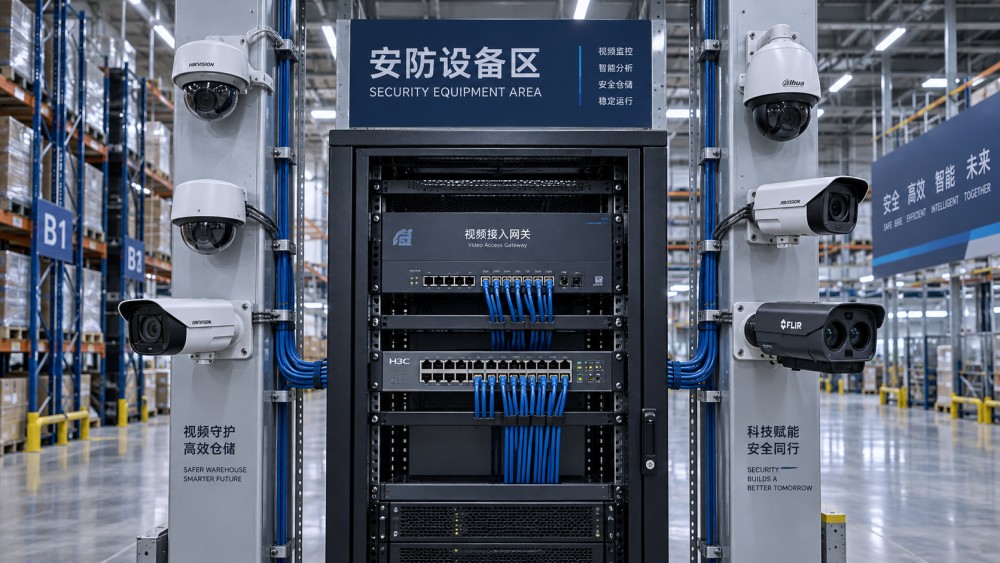
Size the gateway against the actual workload: incoming bitrate, camera count, simultaneous viewing, recording demands, and any decoding or analytics processing. A quoted maximum camera count is not meaningful without its test conditions. Thermal streams, high-resolution cameras, and multiple streams per device can change the workload substantially.
Existing recorders deserve separate attention. A cloud platform’s ability to integrate a camera does not imply that it can import recordings, settings, or events from the existing NVR. Recorder integration may expose only selected channels or functions. Historical footage may need to remain accessible through the previous system during a planned transition period.
Where mixed-brand deployments lose functionality
Advanced analytics are a frequent source of mismatch. A camera may generate object classifications, license-plate results, or specialized thermal alarms, while the cloud VMS accepts only video and basic motion events. The image remains available, but the operational intelligence does not.
Distinguish camera-generated analytics from platform-generated analytics. If the VMS analyzes video itself, some camera metadata may be unnecessary. Yet platform analytics can introduce different licensing, processing, bandwidth, and privacy considerations. They should not be assumed to reproduce the camera’s functions or accuracy.
Specialized devices need closer inspection. Viewing a thermal image is not the same as receiving radiometric measurements or temperature alarms. Displaying a multi-sensor camera does not establish whether every sensor is separately searchable, recorded, or licensed. Audio capture, two-way communication, relay outputs, and digital inputs also require explicit validation.
Integration with access control or building management introduces another boundary. A camera’s ONVIF conformance does not establish that an access-denied event can open the correct video clip in the cloud interface. That workflow depends on the relevant APIs, event mapping, timestamps, and permissions across systems.
Bandwidth, outages, and security cannot be separated
Mixed-brand compatibility is of little value if the network cannot sustain the recording policy. Estimate upstream demand from configured bitrates and upload behavior, not resolution alone. Frame rate, codec, scene movement, image noise, and compression settings all affect traffic.
As a planning example, ten streams averaging 2 Mbps represent roughly 20 Mbps of video payload during continuous upload, before overhead and other traffic. That is an illustration, not a sizing recommendation. Measure representative footage, leave headroom, and test concurrent viewing and footage recovery.
Ask what happens when connectivity fails. Does recording continue locally? Where is footage stored, for how long, and under whose control? Does reconnection trigger automatic backfill, and can operators distinguish recovered footage from a permanent gap? Backfill may compete with live uploads unless bandwidth is managed.
Security review should cover the complete path from camera to gateway to cloud. Confirm unique credentials, supported authentication methods, network segmentation, encryption boundaries, certificate management, and firmware maintenance. An encrypted cloud connection does not necessarily mean the local camera-to-gateway stream is encrypted.
Avoid treating internet-exposed camera ports as a routine integration shortcut. Prefer documented connection methods that minimize exposure, and review any remote-support access. For older devices that cannot meet security requirements, retaining them may cost more in compensating controls than replacing them.
Governance and procurement need separate evidence
Technical interoperability is not regulatory approval. GDPR-related assessments depend on the processing purpose, lawful basis, retention, access controls, processor arrangements, and any international transfers. A cloud region selection alone does not resolve all of those questions.
Similarly, applicable NDAA-related procurement restrictions require assessment of the equipment, entities, contract, and relevant rules. Moving video into a cloud platform does not change the origin of an installed camera or automatically make it acceptable for a restricted deployment.
Global Smart-Security & Space Intelligence (G-SSI) brings a cross-disciplinary benchmarking perspective to these decisions, linking video surveillance with access control, building systems, and thermal sensing. That perspective helps separate evidence categories: ONVIF conformance addresses interoperability, while relevant ISO, IEC, or UL requirements concern distinct management, technical, or safety matters. None should be used as a blanket endorsement of an entire deployment.
Test the workflow before committing the fleet
Build an inventory containing camera model, firmware, location, recording policy, required events, and business criticality. Then select a pilot that includes the difficult devices—not just the newest fixed camera on a clean network.
Acceptance testing should cover live view, playback, required alarms, evidence export, permissions, time synchronization, network interruption, and camera or gateway restart. Verify recovery after an outage and record which features are unavailable. Repeat essential checks after firmware or platform changes.
Commercial evaluation should include more than the camera subscription. Gateway replacement, analytics licenses, storage, support, export charges where applicable, and maintaining a legacy system during migration can alter the economics. Also confirm how footage and configuration can be retrieved if the service relationship ends.
A cloud VMS can preserve substantial value in a mixed-brand camera estate. The defensible choice is the platform that supports the required workflows on the actual installed devices, with documented limitations and tested recovery—not the one claiming the longest compatibility list. Before rollout, obtain a model-and-firmware support matrix and approve the pilot against explicit operational requirements.
Related News
Thermal Sensing
Curation by industry experts
Popular Tags
Related Industries
- ASELSAN Says EJDERHA AD Disabled 51 Drones in a Single TestASELSAN says EJDERHA AD disabled 51 drones in seconds without missiles. Discover what the test reveals about electromagnetic counter-drone defense.
- How to prepare HVAC procurement specifications for Middle East heatMaster procurement specification preparation Middle East projects need. Learn how to compare HVAC bids, address extreme heat and define clear acceptance criteria.
- FBI Exposes FaceStealer Campaign Using Stolen Video to Bypass Face ChecksFBI exposes the FaceStealer campaign's use of stolen video to bypass facial liveness checks. Explore the risks and lessons for businesses.
Weekly Insights
Stay ahead with our curated technology reports delivered every Monday.